Energy Delivery Verification - Requirements & Validation
Overview
This section outlines the validation and verification logic of the activated flexiblity or baseline. To compute the delivered flexibility, the verification service uses the baseline and metering data provided by the flexibility seller.
The flowchart below illustrates the steps that lead to a successful verification process.
flowchart LR
    A[1.Sell order creation] -->B[2.Baseline submission]
    B --> |Data type validation| C[Verification]
    D[3.Flexibility Activation and Delivery] --> E
    E[4.Metering Data submission] --> |Data type validation| C
    C -->|logic validation| G[6.Verification Result]
Note
The baseline can be submitted during the sell order creation or after order creation through the verification API. Only after the baseline is received the order is active and added to the matching process.
-
The flow chart begins with the creation of a sell order
-
The baseline (data format) is submitted during the sell order creation or after order creation through the verification API
-
After the sell order has been matched with a corresponding buy order the flexibility activation and delivery process is initiated by the flexibility seller.
-
The metering data (data format) is submitted. Data type checks are applied during metering data submission.
-
The verification process is executed which first validates the baseline and metering data (business validation validation). If successful, the verification process continues and the verification result is created.
Verification Result Format
  "verification": {
    "verification_id": string, // UUID format
    "status": string, // e.g., "completed_success"
    "result": {
      "created_at": string, // ISO 8601 date-time format
      "baseline": {
        "energy": float, // computed energy of the trade timeframe
      },
      "metering": {
        "energy": float, // computed energy of the trade timeframe
      },
      "scheduled": float, // volume from trade event
      "delivered": float, // delivered flexibility
      "delivered_percentage": float, // total delivered flexibility in percentage 0 - 100
      "delta_absolut": float, // calculated flexibility delivered - flexibility scheduled
      "delta_percentage": float, //  (calculated flexibility delivered - flexibility scheduled) / flexibility scheduled * 100
      "unit": string, // e.g., "kWh"
      "status": string, // e.g., "success" or "error"
      "details": {
      "error": string, // error code or description
      "message": string // detailed error message
      }
    }
  }
Baseline and Metering Data Format
The verification service processes the following data must be provided by the flexibility seller for each sell order:
- Baseline forecasted consumption data (during order creation)
- Metering measured metering data from the metering point with the same metering ID (after a successful order match and activation)
The data format of the baseline and metering data is identical. The exact specification can also be found in the OpenAPI specification.
Note
The required time period for the baseline and metering data is defined by the delivery start and end of the contract. The time period of the submitted baseline and metering data must at least cover contract delivery start and end time. It is possible to submit baseline and metering data that is longer than the contract delivery time. The verifcation service will select the data points that are within the contract delivery time.
Requirements for the baseline and metering data are:
- same resolution/sampling rate
- same unit of measurement
- same metering ID
- same reading start and end times
Requirements for the baseline or the metering data are: - reading start and end times must match with first and last data point timestamps
{
  "metering_data": {
    "metering_id": string, // UUID format
    "created_at": string, // ISO 8601 date-time format
    "reading_start": string, // ISO 8601 date-time format
    "reading_end": string, // ISO 8601 date-time format
    "resolution": integer, // in seconds
    "unit_measured": string, // Enum: "W" "kW" "MW" "kWh" "Wh" "MWh"
    "data_points": [
      {
        "timestamp": string, // ISO 8601 date-time format
        "value": float // measured value
      }
    ]
  }
}
The validation checks are summarized in the table below with the corresponding error messages. The validation enforces consistency between baseline and metering datasets and verifies that the energy delivery complies with the contract.
Validation Checks
| # | Validation Check | Requirement | Error Message |
|---|---|---|---|
| 1 | Metering ID consistency | The metering_id in baseline and metering must match |
metering_id does not match, baseline: <baseline_id>, metering: <metering_id> |
| 2 | Time resolution consistency | Baseline and metering must have the same sampling rate, e.g. 15 min | resolution does not match, baseline: <baseline_resolution>, metering: <metering_resolution> |
| 3 | Reading start time alignment | Reading start of baseline and metering must match within 60 seconds tolerance | baseline and metering reading end mismatch exceed maximum tolerance, baseline: <baseline_end>, metering: <metering_end> |
| 4 | Reading end time aignment | Reading end of baseline and metering must match within 60 seconds | baseline and metering reading end mismatch exceed maximum tolerance, baseline: <baseline_end>, metering: <metering_end> |
| 5 | Baseline first data point before reading start | First data point in baseline must not be before reading start | baseline first datapoint is before specified reading start |
| 6 | Metering first data point before reading start | First data point in metering must not be before reading start | metering first datapoint is before specified reading start |
| 7 | Baseline last data point before reading end | First data point in baseline must not be before reading end | baseline last datapoint is before specified reading end |
| 8 | Metering last data point before reading end | First data point in metering must not be before reading end | metering last datapoint is before specified reading end |
| 9 | Contract delivery start and end times within Baseline | Trade delivery times must be within baseline timeframe | contract trade delivery start/end is not within baseline time frame |
Verification Process
The verification process is executed by the VerificationProcessor class, which is instantiated with the DatabaseObject. The process involves the following steps:
sequenceDiagram
    participant vsrv as Verifier Service
    participant VerificationProcessor
    participant Baseline
    participant Metering
    participant Contract

    vsrv->>vsrv: initialise with Order Manager Event (metering data received)

    vsrv->>VerificationProcessor: execute_verification_process(contract)

    VerificationProcessor->>Contract: get traded energy
    VerificationProcessor->>Baseline: get baseline datapoints
    VerificationProcessor->>Metering: get metering data points

    VerificationProcessor->>VerificationProcessor: calc_flexibility(sum_baseline, sum_metering, traded energy)

    alt Flex delivery too low
        VerificationProcessor->>VerificationProcessor: verification status to Error
    else Flex delivery acceptable
        VerificationProcessor->>VerificationProcessor: verification status SUCCESS
    end

    VerificationProcessor->>VerificationProcessor: compute delta scheduled

    VerificationProcessor->>VerificationProcessor: create contract verification result
    VerificationProcessor->>vsrv: return VerificationResult
The verification processor calculates the delivered flexibility by summing the baseline and metering data points. The delivered flexibility is then compared to the traded energy volume from the contract. If the delivered flexibility percentage is in the green and white area of the image below the verification status is set to "success", if the verification status is in the red area the verification status is set to "error".
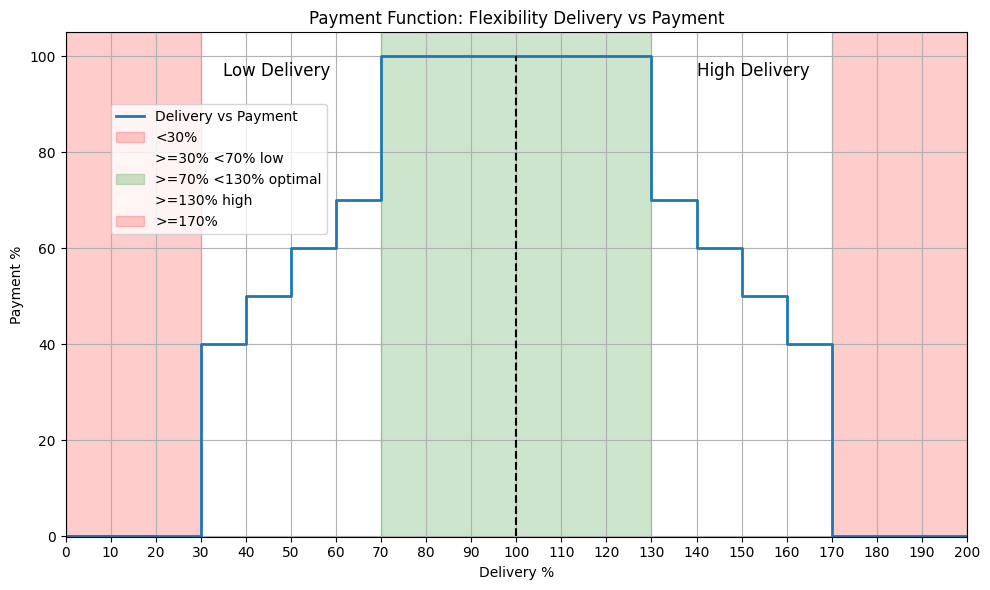
Fig. Delivery vs payment
Example Payload Sell Order with Baseline Data
{
        "side": "sell",
        "power": 1000,
        "price": 1,
        "delivery_start": "2026-08-01T10:00:00Z",
        "delivery_end": "2026-08-01T11:00:00Z",
        "expiry_time": "2026-08-01T09:00:00Z",
        "location": {
            "location_id": [
            "FI_123435"
            ],
            "country_code": "FI"
        },
        "baseline": {
            "metering_id": "ce15bc33-2bda-4d26-8ddd-b958b22b569b",
            "created_at": "2026-08-01T08:00:00Z",
            "reading_start": "2026-08-01T10:00:00Z",
            "reading_end": "2026-08-01T11:00:00Z",
            "resolution": 900,
            "unit_measured": "kWh",
            "data_points": [
            {
                "timestamp": "2026-08-01T11:15:00Z",
                "value": 1
            },
            {
                "timestamp": "2026-08-01T11:30:00Z",
                "value": 2
            },
            {
                "timestamp": "2026-08-01T11:45:00Z",
                "value": 3
            },
            {
                "timestamp": "2026-08-01T12:00:00Z",
                "value": 4
            }
            ]
        }
    }